
How online booking for fishing guides works
Online booking for a fishing guide means a guest picks a trip and date on your website, enters their party, pays a deposit or the full price, and gets a confirmation. Your calendar updates so the day cannot be sold twice. You then see the guest list, notes and payment status for that day.
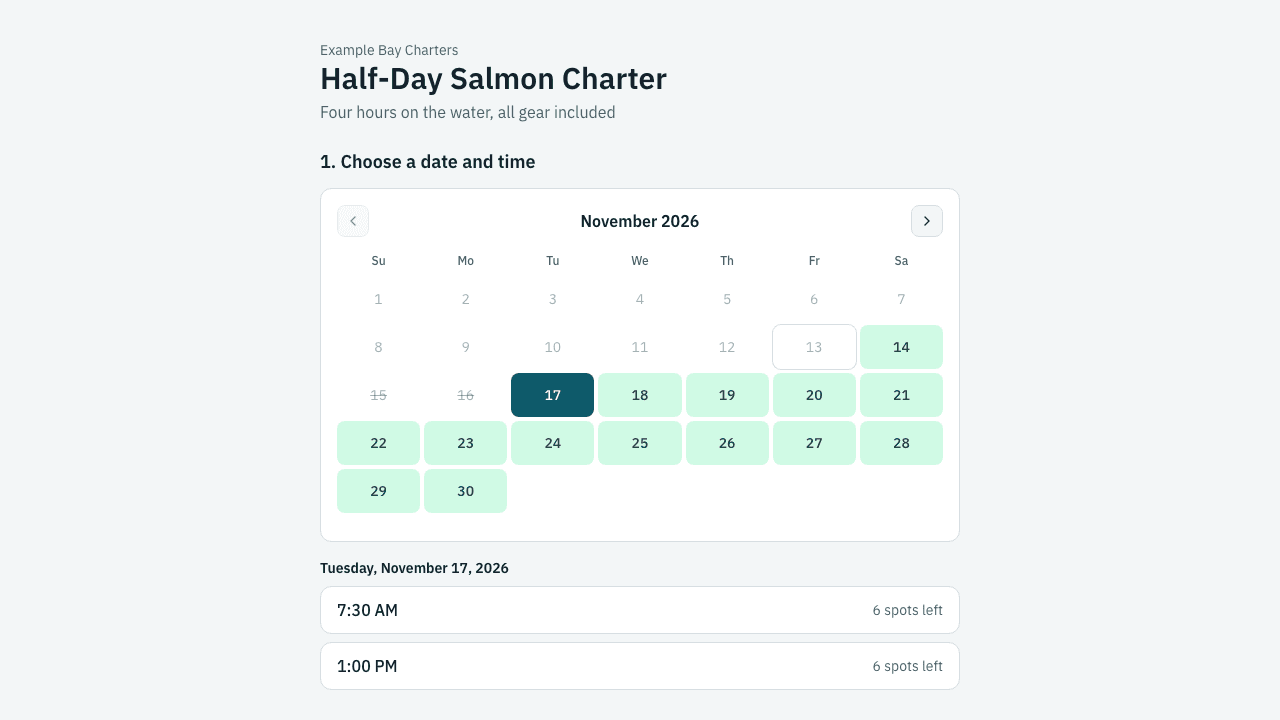
What does the guest see from start to finish?
A good flow has five steps and works on a phone, because most anglers book from one.
- Choose a trip. Half day, full day, private or shared, each with its own price and photos.
- Choose a date and time. Only dates you can actually run are open. A trip that is full or past its cutoff cannot be picked.
- Enter the party. Guests are entered by type, such as adult and youth, and each type has its own price. Required questions come here: names, experience level, rod and gear sizes, license numbers where the trip needs them.
- Pay. The guest pays in full, or a deposit now and the balance later (see deposits and balances).
- Get a confirmation. An email with the date, meeting point, what to bring, your cancellation terms and a link to sign the waiver.
On OutwardOps, steps 1 to 5 run on a hosted booking page for your company, and each trip has its own link you can put on a "Book now" button. See online booking and checkout.
How does a guide keep from double-booking?
The system holds the things a trip needs, not just the date. A guide with one boat and one captain can run one trip at a time, so booking a morning trip for four people uses the boat and the guide for those hours. Another guest then cannot book the same boat at an overlapping time.
Set this up once: list your boats, guides and gear, then tell each trip what it needs and for how long. See availability and inventory and schedules.
A few rules worth setting early:
- Party size. Minimum and maximum guests per trip, for example a private trip that takes up to six.
- Cutoff. How close to departure a guest can still book online. Inside the cutoff you can send them to call.
- Seats left. Show "3 seats left" only when a few remain, so a nearly empty trip does not look empty.
What should you collect at booking?
Ask for what you would otherwise chase by text the night before.
- Names and a phone number for every trip, and an email for the confirmation.
- Fishing license numbers or other permit details if the trip requires them.
- Experience, target species, and any physical limits you should know about.
- Add-ons: lunch, extra rods, fish processing, a second guide.
Custom fields can be required or optional, per booking or per guest, and the answers show up on your manifest. See custom fields and booking flows. Keep the form short. Every extra required question costs some bookings, so ask only what you will use.
What happens after the booking?
Most of the work is the follow-up, and it should run on its own.
- Waiver. Each guest signs by link, with a guardian signature for minors. Signed status shows next to their name. See waivers.
- Reminders. Email reminders go out before the trip with the meeting point and what to bring. See reminders.
- Balance. If the guest paid a deposit, the balance is charged automatically before the trip, and a pay link is emailed if the charge fails.
- Changes. If you move a trip for weather, you can email every guest on that departure at once.
How do you take bookings by phone and walk-up?
Online booking does not replace the phone. You enter those bookings yourself, take a card, cash or check, or mark the balance to collect later. They use the same calendar, so a phone booking blocks the boat the same way. For a payment on the spot, use a pay link or quick charge.
What does it cost?
On OutwardOps it is free for the operator. Guests pay a 6% convenience fee on online bookings. See the pricing page and, for context on what other systems publish, FareHarbor pricing explained.
How do you start?
- List your trips, with customer types and prices.
- Add your boats, guides and any gear that limits capacity.
- Create dates or a repeating schedule.
- Set a deposit rule and your cancellation terms.
- Put the booking link or button on your website and test it end to end with a real card and a small refund.
If you are a guide rather than a boat operator, the fishing guides page and fly-fishing guides page show what the setup looks like for a one or two person operation.
Frequently asked questions
Do I need my own website to take online bookings?
You can send guests to your hosted booking page from a link on social media or in email. A website is better, because the booking button lives next to your photos and trip descriptions.
Can guests book without creating an account?
Yes. Guests enter their party and contact details and pay. They get a booking link by email to view the booking.
Can I limit a trip to one party?
Yes. Make a private trip with a maximum party size and let it use the whole boat for that time, so nobody else can book the same departure.
What if a guest needs to cancel?
Your cancellation terms are shown at checkout and in the confirmation email. See [how to write a weather cancellation policy](/resources/weather-cancellation-policy) for the weather side.
Can I still take cash?
Yes. Staff can enter a booking and record cash or check, or choose collect later.